What is Kaiden?
Kaiden is an open-source tool for managing agentic coding environments. Instead of giving autonomous agents unrestricted access to your machine, Kaiden wraps your preferred coding agents — Claude Code, Goose, Cursor, and others — in isolated Podman or MicroVM sandboxes.
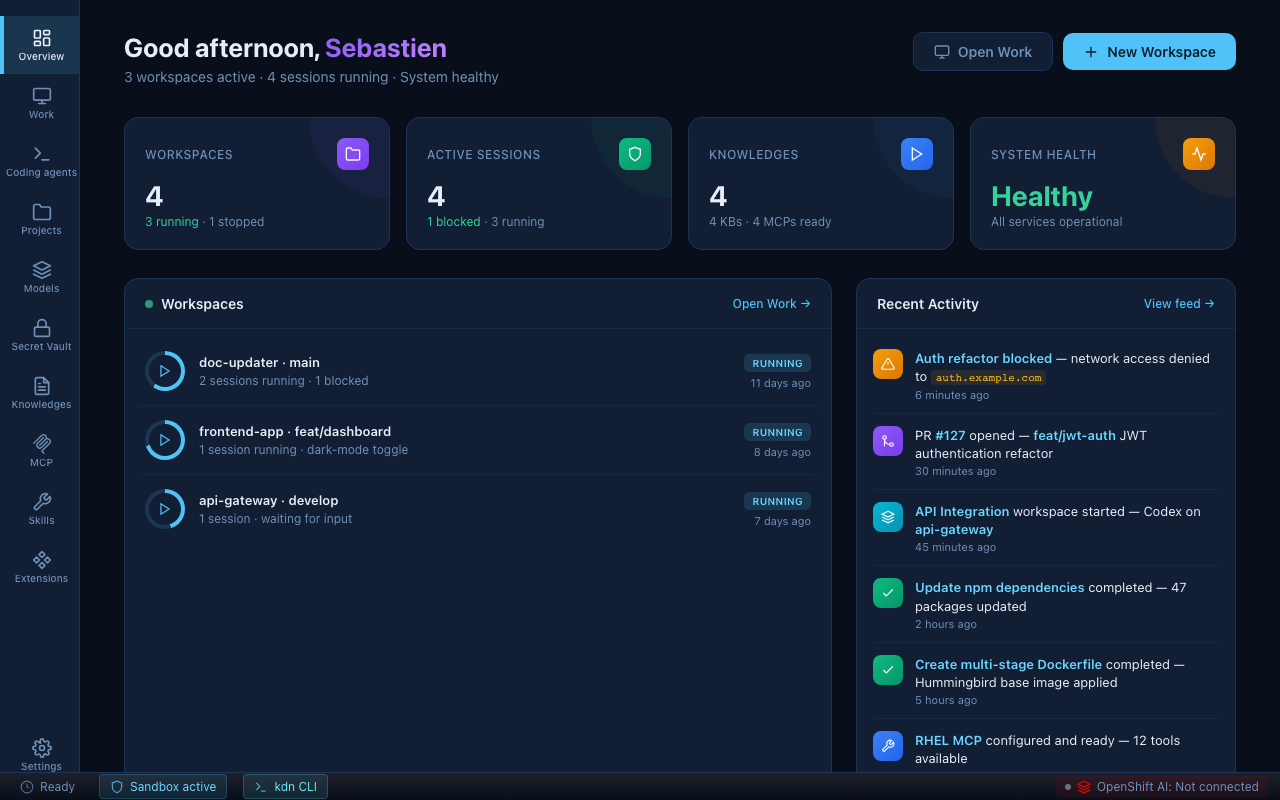
Security: Bound the damage radius
Agents are wrapped in isolated, disposable sandboxes. Each sandbox has its own filesystem scope, its own network rules, and its own credentials. Whatever the agent does — good or bad — stays inside the sandbox.
- The agent can only read and write the project directory you shared with it.
- Outbound network connections are blocked by default. Only the hosts you've allowed can be reached.
- Every blocked connection is logged and surfaced in the dashboard so you can see exactly what was attempted.
No firewall rules to write. No container setup. The isolation is on by default.
Governance: Enforce the rules
Define strict, automated policies on which tools, secrets, and models are permitted — at the project level, enforced for every agent session that runs under it.
- Secrets: credentials are injected into the sandbox automatically. The agent uses them without ever seeing the raw value. Rotate a token in the Secret Vault; it takes effect immediately across all running sandboxes.
- Network policy: choose between "allow known services" (credentials determine reachable hosts) and strict mode (explicit allowlist only). The policy is hot-reloadable — add a host while the agent is running without restarting anything.
- Models: restrict which models an agent is allowed to use. In enterprise environments, only models approved by your data science team appear in the picker.
Context: Connect the dots
Agents are seamlessly equipped with your enterprise APIs, MCP servers, and data — without you writing config files or setting environment variables.
- Secret Vault: attach GitHub, Jira, Slack, or any custom API to a sandbox in one click. The credential is injected as the correct HTTP header on every request to that host.
- MCP Servers: extend the agent with live tools — query a running Kubernetes cluster, manage RHEL packages, interact with OpenShift deployments.
- Knowledge Bases: index your internal documentation, runbooks, and API references. The agent searches them at query time, staying current with your org's context.
- Skills: pre-built capability packages for Kubernetes, OpenShift, RHEL, and Podman give the agent structured domain knowledge without prompt engineering.
Cost: Defeat the cloud tax
Hybrid AI routing dynamically shifts workloads between cloud APIs, on-prem, and local models — based on content, cost, or compliance requirements.
- Semantic Routers: route requests by keyword, PII detection, or jailbreak detection. A coding question goes to the fast cloud model; a prompt touching internal data goes to your on-prem model.
- Local models: run Ollama or Ramalama on your machine. Agents use them with zero configuration changes — Kaiden routes the model call to the local server transparently.
- In-house models: connect to an OpenShift AI cluster. Only models approved by your organization appear in the agent's model picker; everything else is blocked.
Open: Maintain freedom
Avoid vendor lock-in. Swap your preferred agents and models without rebuilding your environment.
- Agents: Claude Code, Goose, Cursor, Codex, OpenCode, Gemini CLI — each plugs in the same way. Switch agents per project or run multiple in parallel.
- Models: Anthropic, OpenAI, Google AI, Azure OpenAI, Ollama, Ramalama, OpenShift AI — all accessible from the same model picker.
- Runtime: Podman (fast, container-based) or MicroVM (hardware-level isolation) — switchable per project without changing anything else.
- Source: Kaiden is open source. The full configuration lives in your project directory as plain YAML.
Built on OpenShell
The sandbox runtime underneath Kaiden is OpenShell, NVIDIA's open-source runtime for safe, private execution of autonomous AI agents. OpenShell provides the low-level machinery that makes Kaiden's security and governance guarantees possible: container and MicroVM isolation, mandatory network policy enforcement, credential injection, and structured security event logging.
Kaiden is an active contributor to the OpenShell project. Features developed for Kaiden — including provider management, sandbox image tooling, and policy primitives — flow back upstream. Running Kaiden means you benefit from the combined investment of the Kaiden and OpenShell communities.
Repositories
The Kaiden project lives in the openkaiden GitHub organization. The two primary repositories:
openkaiden/kaiden — the desktop application. A TypeScript/Svelte Electron app that provides the GUI, the workspace wizard, the secret vault, model management, and all the end-user surfaces described in this documentation.
openkaiden/openshell-image-builder — a CLI for building custom sandbox images based on your Kaiden workspace configuration. Use it when the default sandbox images don't include a tool or runtime your agent needs.
Supporting repositories include kdn (the Go CLI that translates Kaiden configuration into OpenShell sandbox operations), kdn-api (shared API definitions), and catalog (the extensions and skills registry).
How it's structured
Kaiden organises work in three layers:
Project → Sandbox → Session
Project — a codebase and its defaults (credentials, network policy, skills, MCP servers). Created once; inherited by all sandboxes.
Sandbox — a secured, persistent environment for a project. Created once, restartable, holds its configuration across sessions. Lives in the Sandboxes sidebar view.
Session — one agent run with a specific goal, inside a sandbox. Ephemeral. Multiple sessions can run in the same sandbox simultaneously. Lives in the Work view.
| Project | Sandbox | Session | |
|---|---|---|---|
| Lifespan | Permanent | Persistent | Ephemeral |
| Purpose | Config and defaults | Isolated runtime | One agent task |
| Where | Projects | Sandboxes | Work |
Status bar
The bar at the bottom of every screen shows live state:
Ready | Sandbox active | ● OpenShell ▾ | OpenShift AI: Not connected
- Sandbox active — at least one sandbox is running
- ● OpenShell — gateway status: green = running, amber = starting, red = stopped. Click to see driver, uptime, and controls.
- OpenShift AI — enterprise model cluster connection status